


Quick answer
Gmail recommends keeping its daily user-reported spam rate below 0.1% and avoiding 0.3% or higher. Amazon SES automatically puts accounts under review at a 0.1% complaint rate and may pause sends at 0.5%. The services use different reporting denominators.
Key findings and sources
Gmail's complaint target and denominator
Gmail recommends a daily user-reported spam rate below 0.1% and asks senders to avoid 0.3% or higher. The dashboard uses eligible inbox messages to engaged recipients, so dividing complaints by total attempted sends can answer a different question.
Gmail, Email sender guidelines FAQ · support.google.com
Personal Gmail recipients and daily DKIM-authenticated Postmaster Tools data, documentation reviewed November 2026. Read the Gmail sender FAQ together with the Postmaster Tools spam-rate dashboard definition.
Gmail bulk mitigation eligibility
Gmail's FAQ says bulk senders with a user-reported spam rate above 0.3% are ineligible for mitigation. Eligibility can return after seven consecutive days below 0.3%.
Gmail, Email sender guidelines FAQ
Bulk senders to personal Gmail recipients, documentation reviewed November 2026. Retain the FAQ's strict above and below boundaries, and distinguish eligibility from delivery guarantees.
Amazon SES complaint review and pause levels
Amazon SES automatically puts an account under review at 0.1% complaints or higher and may pause sending at 0.5% or higher. The complaint rate uses an account-specific representative volume of email.
Amazon SES, Reputation metrics messages
Amazon SES account complaint-rate review and possible suspension thresholds, documentation reviewed November 2026. Read the SES reputation documentation for the complaint metric and action thresholds.
Why blended complaint rates can mislead
In a worked example, 12 complaints divided by 4,000 eligible provider deliveries produce a 0.30% rate. Dividing those same 12 by 40,000 blended deliveries produces 0.03%, one tenth the provider-specific rate.
Illustrative comparison with 4,000 provider deliveries and 40,000 total deliveries. Calculate reports divided by deliveries for each explicitly assumed denominator.
Compare the results
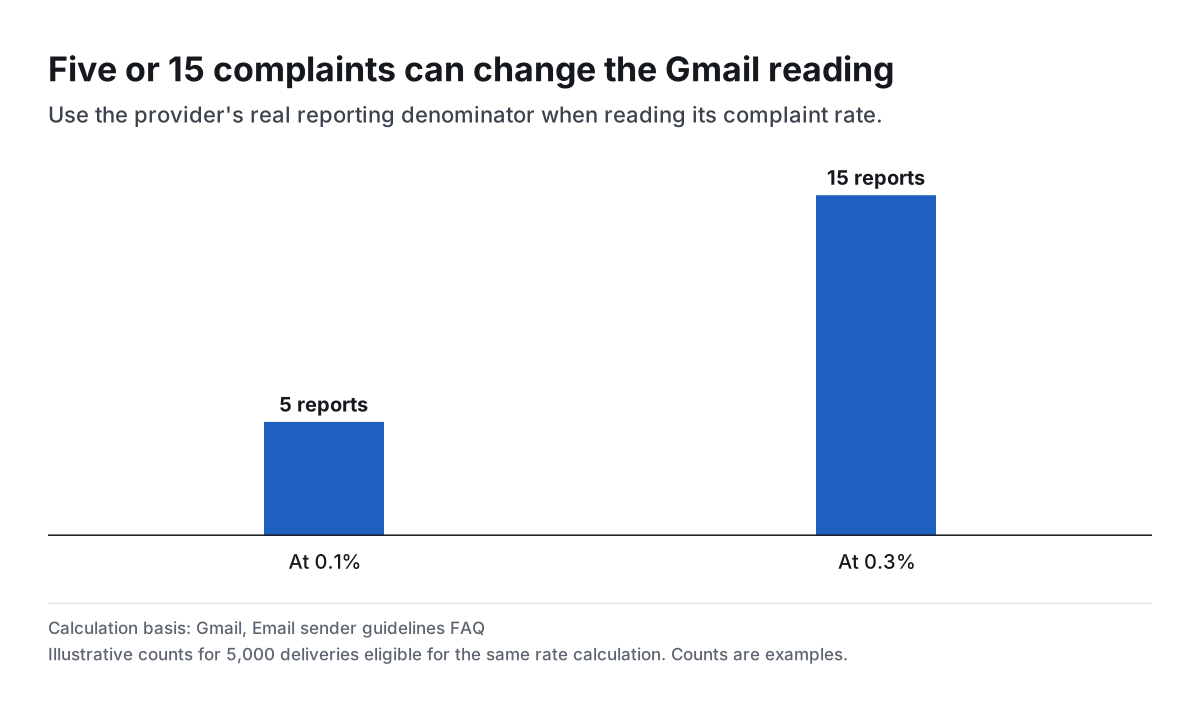
Five or 15 complaints can change the Gmail reading
Use the provider's real reporting denominator when reading its complaint rate.
One complaint rate can hide another
Imagine a recovery campaign has 12 user complaints among 4,000 eligible Gmail inbox deliveries and no complaints in the remaining 36,000 deliveries. The Gmail-specific rate is 0.30%. A blended calculation divides those same complaints by 40,000 and reports 0.03%. The tenfold difference comes entirely from which deliveries the metric counts.
Gmail's Postmaster spam-rate dashboard is based on user spam reports for messages reaching engaged recipients' inboxes, with the authentication and placement rules in its help page. The total attempted send count is a poor substitute. A low or missing dashboard value is worth checking against the provider's coverage, particularly if inbox placement has fallen.
The 0.1%, 0.3% and 0.5% numbers have different jobs
Gmail's operating target is below 0.1%. It asks senders to avoid reaching 0.3% or higher and says bulk senders above 0.3% are ineligible for mitigation. To regain eligibility, its FAQ requires seven consecutive days below 0.3%. In a worked denominator of 5,000 eligible deliveries, five complaints land exactly at 0.10% and 15 land exactly at 0.30%.
Amazon SES looks at a representative amount of account email that can change with sending patterns. Its 0.1% review trigger and 0.5% possible pause threshold apply to that metric. Hard bounces have their own, separate 5% and 10% thresholds in the SES documentation. Use separate checks for invalid addresses, unwanted messages and inbox placement.
How to track the recovery campaign
Record the provider, the campaign or flow, the reporting window, the complaint count and the denominator your reporting tool actually exposes. Keep the checkout trigger and each reminder step identifiable. If a provider only shows an account or domain-level rate, keep that as its own record. Use campaign-level feedback to investigate a change where the provider offers it.
Check purchase and unsubscribe suppression before a reminder can queue and again before delivery. If complaints rise, inspect the audience and the reminder that changed before increasing volume. A flow can deliver new sales and still deserve an edit if it repeats a message after purchase or reaches people who no longer expect it. Track contribution and complaints together when you decide whether to keep an additional touch.
Study data
| Measure | Value | Context |
|---|---|---|
| Gmail / recommended spam-rate ceiling | 0.1% | Published policy parameter |
| Gmail / level to avoid reaching | 0.3% | Published policy parameter |
| Gmail / bulk mitigation unavailable above | 0.3% | Published policy parameter |
| Gmail / days below 0.3% for bulk mitigation eligibility | 7 days | Published policy parameter |
| Gmail / approximate bulk-sender volume threshold | 5,000 messages | Published policy parameter |
| Gmail / bulk-sender volume window | 24 hours | Published policy parameter |
| Gmail / bulk unsubscribe processing window | 48 hours | Published policy parameter |
| Measure | Value | Context |
|---|---|---|
| Amazon SES / complaint review starts at | 0.1% | Published policy parameter |
| Amazon SES / sending may pause at complaint rate | 0.5% | Published policy parameter |
| Amazon SES / hard-bounce review starts at | 5% | Published policy parameter |
| Amazon SES / sending may pause at hard-bounce rate | 10% | Published policy parameter |
| Measure | Value | Context |
|---|---|---|
| Yahoo / bulk unsubscribe processing window | 2 days | Published policy parameter |
What changes when you compare the figures
| Comparison | Result | Calculation |
|---|---|---|
| Complaints exactly at Gmail's 0.1% level in 5,000 eligible deliveries | 5.0 complaints | = 5000*0.1/100 |
| Complaints exactly at Gmail's 0.3% level in 5,000 eligible deliveries | 15.0 complaints | = 5000*0.3/100 |
| Maximum whole complaints strictly below 0.1% in the 5,000 example | 4.0 complaints | = 5000*0.1/100-1 |
| Maximum whole complaints strictly below 0.3% in the 5,000 example | 14.0 complaints | = 5000*0.3/100-1 |
| Provider-specific rate at 12 complaints among 4,000 eligible deliveries | 0.3% | = 12/4000*100 |
| Blended rate for the same 12 complaints across 40,000 deliveries | 0.03% | = 12/40000*100 |
| Ratio of the provider-specific worked rate to the blended worked rate | 10.0 ratio | = (12/4000)/(12/40000) |
| Ratio of Amazon SES possible pause threshold to review threshold | 5.0 ratio | = 0.5/0.1 |
| Hours in Yahoo's two-day unsubscribe window | 48 hours | = 2*24 |
Methodology and sources
Read each provider's published documentation for the metric, reporting window, audience and threshold. Convert rates to illustrative complaint counts using the same explicitly assumed denominator. These calculations describe threshold arithmetic, not measured sender behavior or predictions about enforcement.
Download the source data (CSV)
Download the calculations (CSV)
Download the citation notes (CSV)
Related reading
Email personalization statistics for subject lines and message copy
Abandoned cart email statistics and how to read revenue per recipient
Cart recovery SMS benchmarks for conversion and unsubscribes
Email open rate statistics and what Mail Privacy Protection changes
Send a Shopify checkout recovery link that opens the right cart
Sources and definitions
Gmail, Email sender guidelines FAQ
Amazon SES, Reputation metrics messages
Yahoo Postmaster, More Secure, Less Spam
The source data includes the population, period, denominator and limitations for every figure.